1
Nobody decided where things go.
Your browser drops downloads in one place, screenshots land on the Desktop, mail attachments go somewhere else again. Every app picks its own spot.
Kempt sorts and renames the mess on your Mac, so you can find things again. Nothing is deleted.
Free to try · €19 once for Pro · macOS 14 or later
Your browser drops downloads in one place, screenshots land on the Desktop, mail attachments go somewhere else again. Every app picks its own spot.
School taught us plenty, but not how to name a file or set up folders that last. So we make it up as we go: final, final_2, final_FINAL.
One file is nothing. Three a day are 1,095 a year, and the pile never seems worth an afternoon. Until it does.
This isn’t a character flaw. It’s where files go if you don’t fight the defaults. Kempt is the afternoon that catches up.
It always gets me a little. I ask a friend for a file, they open a folder, and their face drops. “Oh god, don’t look. It’s such a mess. I really need to clean this up.” And then they never do.
My aunt’s kitchen was the same. Expired spices, old baking stuff, cupboards you didn’t want to open. I kept telling her to take one day and sort it out. “I don’t have time for that.” So every time she cooked, all those little things bugged her, like a mosquito you can’t catch. Then she finally did it. It took her a whole day. Now cooking feels different. Everything has its place, and she can see what she has. And that’s just physical stuff. Digital clutter is worse, because you can’t even see it piling up.
That’s the feeling I want for your Mac. I already help people organise their digital life and their business with natrix flow, so I built the tool I kept wishing I could hand them. Not just a cleaner for one big day, but something that helps you keep it that way.
It’s one of my passion projects, and it’ll keep growing.
Jenny

Rubbish from the pantry cupboard
How does it feel???
Amaaaaazing
Woohooo
One full day = so much joy from now on
Yes, I hope it stays that way
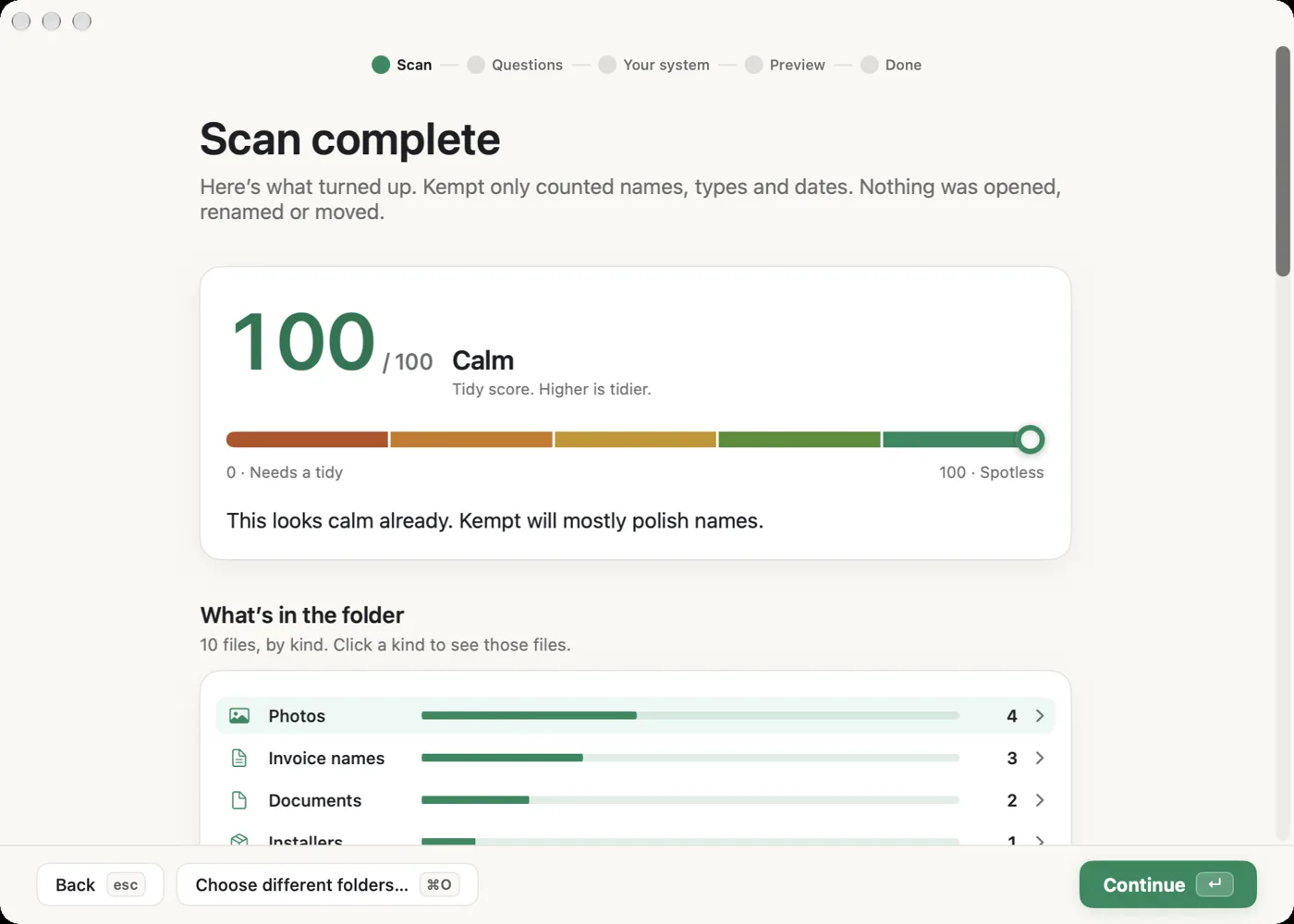
Kempt only looks where you point it. It sorts the files sitting in that folder. Files already in subfolders are counted for the score, but never moved.
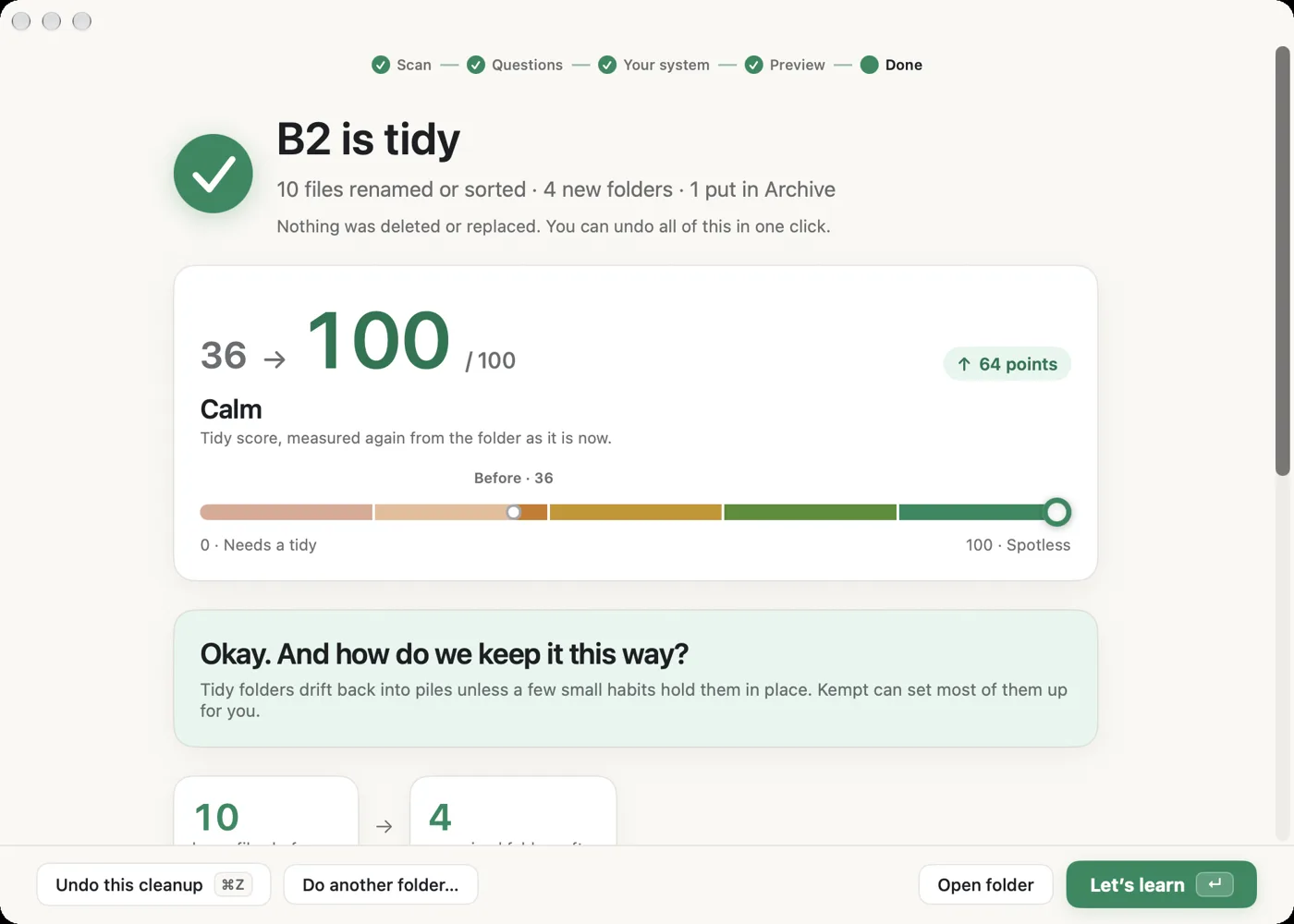
After a cleanup, Kempt measures again — in the demo, from 36 to 100.
What held a score of 36 back
Kempt asks a few questions, then suggests a folder layout — by project, by topic, or by date. You can change it, or make your own. Here’s the first question; the other two are in the app.
In the app, two more questions follow — and you can always pick another setup.
Try it in KemptScroll to watch, or jump to before and after. One click, and the score goes from 36 to 100.
A typical messy Downloads folder.
No mockups. These are straight from Kempt on my Mac.
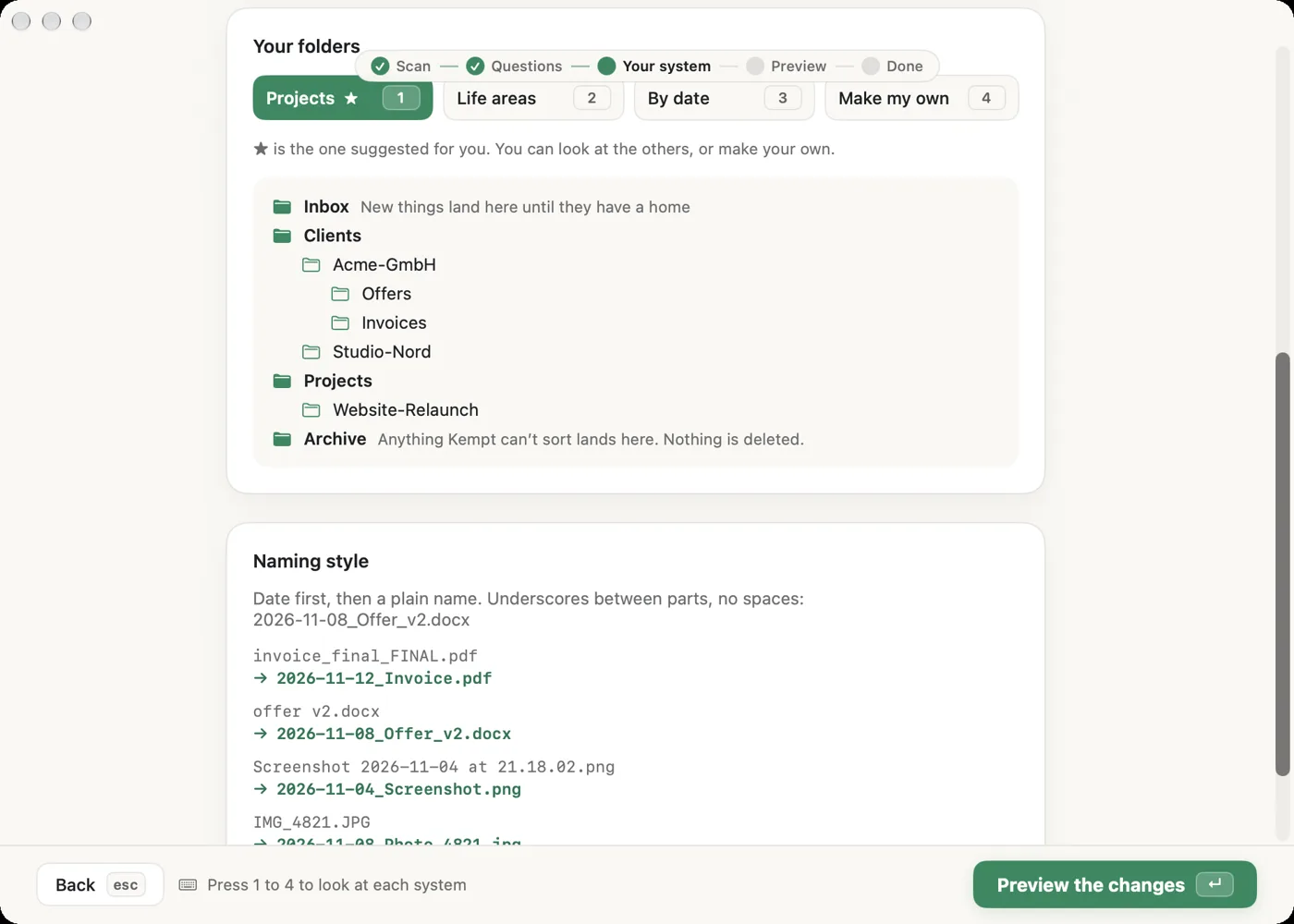
invoice_final_FINAL.pdf becomes 2026-11-12_Telekom_Invoice.pdf. Year first, then who and what.
Kempt reads PDFs and scans on your Mac and finds the date, sender and type. Anything it isn’t sure about lands on a “Check these” list.
Photos taken close together go into trip folders by date. You can switch on place names like 2026-11-MADEIRA — off by default.
Every cleanup is saved in History. Search old and new names, and undo with one click. Kempt checks first. If a step can’t be reversed, it explains why and moves nothing.
Most steps work with Return and Esc. Switch on keyboard hints to see every shortcut.
Tidying once is the easy part. Staying tidy means changing a couple of Mac defaults. Kempt can do that for you.
Kempt sets it up in one click, and can put it back.
Choose a place once, and new files start there.
Year first, so everything sorts itself.
A reminder on your Mac or in your Calendar.
Coming soon: Kempt Autopilot keeps folders tidy in the background, with every change undoable.
Only two things ever go online: checking your Pro license key, and (only if you switch it on) looking up place names for photo trips. For that, only coordinates are sent, never the photos. How Kempt works →
The free app tidies 30 of your own files for real. Kempt Pro is €19 once, not a subscription. After you buy, Freemius emails a license key to paste into Kempt.
| Free | Kempt Pro | |
|---|---|---|
| Scan any folder and see your tidy score | Yes | Yes |
| Folder system suggestion and full preview | Yes | Yes |
| Learn guides and habit setup | Yes | Yes |
| Tidy files | 30 files to try it | Unlimited |
| Price | Free | €19 once |
Freemius handles payment, VAT and invoices. If tax applies, you’ll see it before you pay.
No. Never. It only renames and moves, and everything can be undone. Files that don’t fit anywhere go to an Archive folder, not the Trash.
No. Everything happens on your Mac. There is no account, no cloud AI and no analytics. The only things that can go online are a license check, once you’ve entered a key, and optional place names for photos, which are off by default. If you switch place names on, Apple gets one GPS position per trip — not the photo. How Kempt works →
Yes. Scanning, the quiz, renaming, sorting, invoice reading, photo trips, Undo and History all work with Wi-Fi off. Without internet, a new license can’t be activated, and place names fall back to date names like 2026-11-Trip. An existing Pro license keeps working for seven days after the last successful check.
The scan itself only reads names, types, sizes and dates. To suggest better names, Kempt may also read text from the first pages of a PDF, and the date and place already stored in a photo. Invoice reading uses Apple’s PDFKit, and Apple’s Vision for scans, all on your Mac. Nothing is uploaded, and the text is held in memory only.
Undo it from History with one click. Before moving anything back, Kempt checks every step. If you’ve moved files by hand, or a newer cleanup touched the same files, it explains why and moves nothing.
Any folder you choose: Desktop, Downloads, Documents, an external drive. Kempt only looks where you point it.
No. Kempt Pro is €19 once. After you buy, Freemius emails a license key. Paste it into Kempt. Freemius handles payment, VAT and invoices.
macOS 14 Sonoma or later, Apple Silicon and Intel. Mac only.
This is only for the beta, because the app isn’t signed with an Apple Developer certificate yet. Open the DMG and drag Kempt into Applications. Open Kempt, then go to System Settings › Privacy & Security, scroll down and click Open Anyway. You only need to do this once. Please don’t turn off your Mac’s security settings, and don’t use Terminal commands to skip the warning. When the app is signed, this note will go away.